
12 minutes
Written: 2026-02-16 11:00 +0000
Windows Compatibility and Scientific Computing
This post is part of the EON and Fortran Frontiers: Bridging Legacy to Modernity series.
Notes on cross-platform portability for scientific codes with legacy components.
Background
Most computational chemistry codes are developed on Linux. macOS shows up in CI matrices or in workshops, a conda-forge feedstock might cover the major platforms, but Windows tends to be tested last and debugged reluctantly 1. This is simply a consequence of the platforms available in most research groups and the priorities of the people writing the code 2.
I have been maintaining eOn 3 for a while now, through a GPR-dimer implementation (Goswami et al. 2025), an on-the-go variant (Goswami and Jónsson 2025), the NEB-MMF work (Goswami, Gunde, and Jónsson 2026), my thesis (Goswami 2025), and more recently the metatensor ecosystem integration (Bigi et al. 2026) 4 and an atomistic cookbook recipe for NEB with machine learning potentials. Along the way, and through contributions to chemfiles and asv, I have collected a tidy set of Windows-specific failure modes. Each has cost at least one CI cycle and occasionally an afternoon.
Reserved Filenames
Windows inherits from DOS a set of reserved device
names
that cannot be used as filenames, regardless of extension: CON, PRN,
AUX, NUL, COM1 through COM9, LPT1 through LPT9.
Case-insensitive, naturally. The Microsoft
documentation
is comprehensive, but in practice most people discover these constraints
from a CI failure rather than from reading the docs.
aux.py in asv_runner (2023)
When writing
asv_runner, the
runner component for the asv benchmarking tool, I had a perfectly
reasonable file called asv_runner/aux.py for auxiliary benchmark
configuration 5. On Linux, no problem. On Windows:
1ERROR: For req: asv-runner. The wheel has a file 'asv_runner/aux.py'
2trying to install outside the target directory
The wheel could not even be installed, let alone the repository
cloned 6. Since asv is used by NumPy, SciPy, and friends for
performance tracking, this surfaced quickly. The
fix was to
rename the file. The same issue appeared in
pypotlib shortly
after, because apparently one lesson is never enough.
CON.cpp in chemfiles (2026)
Three years later, while adding .con file support to
chemfiles, I named
the implementation files CON.hpp and CON.cpp after the format they
implement 7. CON is of course also a reserved device name.
The files were renamed to _CON.hpp and _CON.cpp. The list of
reserved names is short enough to memorize, but apparently long enough
to forget between projects. The divergence in kernel handling is shown
in Figure 1.
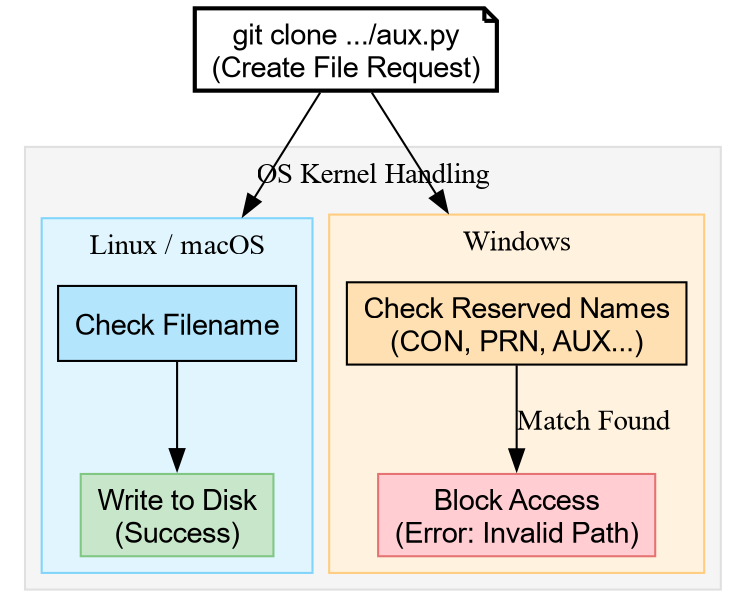
Figure 1: The OS kernel divergence: Windows blocks the request before it even reaches the disk if a reserved name is detected.
Stack Sizes and Legacy Fortran
The default stack size on Linux is typically 8 MB (ulimit -s). On
Windows, it is 1 MB. This is rarely a problem for modern C++ since
Eigen::MatrixXd and friends allocate on the heap, but it matters
enormously for legacy Fortran, where local arrays live on the stack by
default.
The GAGAFE Subroutine
The eOn code includes Embedded Atom Model potentials implemented in
Fortran 77. The core routine is called GAGAFE, and I rather enjoy
knowing where the name comes from 8:
GAGAFE stands for ‘group of atoms, group of atoms, force and energy’. In a system with two types of atoms, A and B, GAGAFE needed to be called three times, once for the A-A interactions, then for the B-B interactions and finally for the A-B interactions. This is coming from the code written in the H. C. Andersen group at Stanford (starting around 1980 when he wrote his famous paper on the velocity Verlet algorithm and the isobaric simulations with the extended Lagrangian). The code ran on a PDP-11 computer in combination with an array processor. I was a post-doc in the group 1986-1988 and kept this basic structure in the F77 code I wrote when I moved to Seattle in 1988.
– Hannes Jónsson (private communication)
There is something appealing about a subroutine name with a provenance older than most of its users. The code has been running continuously for over four decades, and it still works.. except on Windows, where the local arrays blow the stack.
The subroutine declares arrays dimensioned with compile-time constants:
1c parameters.cmn
2      parameter (MAXPRS = 200000)
3
4c gagafeDblexp.f
5      DIMENSION phi(MAXPRS), phivirst(MAXPRS)
6      DIMENSION RA1(MAXCOO), RA2(MAXCOO), FA1(MAXCOO), FA2(MAXCOO)
phi and phivirst alone consume around 3 MB. Including the remaining
arrays, the total stack footprint is roughly around 3.6 MB which is well
beyond the 1 MB Windows default. The client crashes on entry to the
potential routine with exit code 3221225725 (decimal), which is
0xC00000FD: STATUS_STACK_OVERFLOW (see Figure
2).
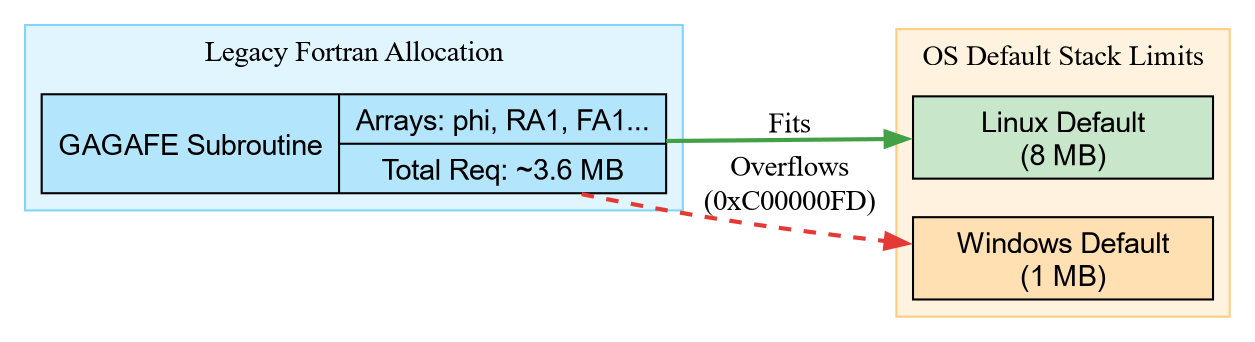
Figure 2: Visualizing the stack overflow: The legacy Fortran arrays fit comfortably within the Linux 8 MB default but exceed the Windows 1 MB limit.
The Fix
For Meson-based builds, the linker can request a larger stack:
1if is_windows
2    if is_mingw
3        _linkargs += ['-Wl,--stack,16777216']  # 16 MB
4    elif cppc.get_id() == 'msvc'
5        _linkargs += ['/STACK:16777216']
6    endif
7endif
The alternative is refactoring the Fortran to use ALLOCATABLE arrays
or COMMON blocks. For code with this kind of lineage, the linker flag
is less invasive. More on working with inherited Fortran in general can
be found in an earlier post.
Stdout Redirection and spdlog
The spdlog logging library provides stdout_color_sink_mt, which uses
ANSI escape codes on Linux and WriteConsole on Windows for colored
output. The catch: WriteConsole only
works when the output
handle is an actual console 9. When a parent process redirects
stdout to a file as the eOn Python server does for every client job,
WriteConsole fails silently.
The symptom is that the client produces no stdout whatsoever. stderr is empty. The exit code may or may not be informative depending on what else breaks downstream. The fix is to select the non-color sink:
1#ifdef _WIN32
2  auto console_sink =
3      std::make_shared<spdlog::sinks::stdout_sink_mt>();
4#else
5  auto console_sink =
6      std::make_shared<spdlog::sinks::stdout_color_sink_mt>();
7#endif
This took longer to diagnose than it should have, mostly because “no output” does not immediately suggest “color codes”, a mechanism detailed in Figure 3.
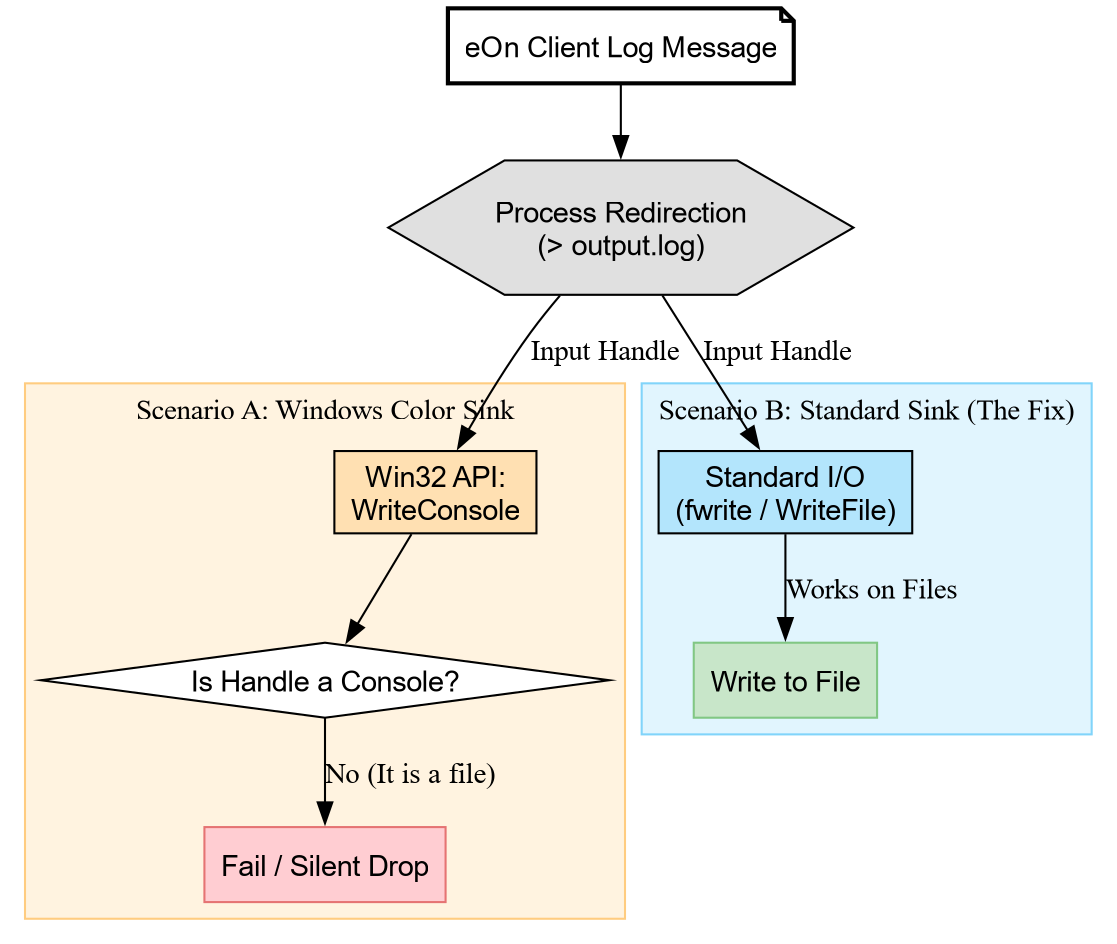
Figure 3: The silent failure mechanism: WriteConsole bypasses standard I/O and fails when the handle is a file, whereas standard sinks use file-compatible APIs.
This has been fixed in recent versions of spdlog, and was likely
simply masking errors from the gagafe issue.
The MinGW/MSVC ABI Boundary
On conda-forge, Fortran libraries are built with MinGW (m2w64) because
there is no MSVC Fortran compiler. The entire grimme-lab stack (xtb,
tblite, dftd4, mctc-lib) uses MinGW consistently, so internally
there is no mismatch. The problem appears when a C++ project built with
MSVC needs to link against one of these libraries.
This surfaced while enabling Windows builds for the eOn
v2.10.0
conda-forge
feedstock. eOn
links against libxtb for the tight-binding potential, and against
libtorch and libmetatensor for machine learning potentials. The
latter two come from the MSVC ecosystem. There is no world in which
everything uses the same compiler 10.
The Import Library Problem
MinGW produces libxtb.dll.a (a GNU-style import library). MSVC’s
linker does not understand this format; it expects xtb.lib. The xtb
conda package does not ship one because it has no reason to 11.
The workaround is to generate an MSVC-compatible import library from the DLL exports:
1dumpbin /EXPORTS "%LIBRARY_BIN%\libxtb-6.dll" > xtb_exports.txt
2echo LIBRARY libxtb-6.dll > xtb.def
3echo EXPORTS >> xtb.def
4for /f "skip=19 tokens=4" %%A in (xtb_exports.txt) do (
5    if not "%%A"=="" echo     %%A >> xtb.def
6)
7lib /DEF:xtb.def /OUT:"%LIBRARY_LIB%\xtb.lib" /MACHINE:X64
This works because xtb exposes a pure C API (xtb.h), and the C ABI
is compatible between MinGW and MSVC. C++ name mangling would be fatal
here, but xtb 12 provide a C interface. The dependency chain is
illustrated in Figure 4.
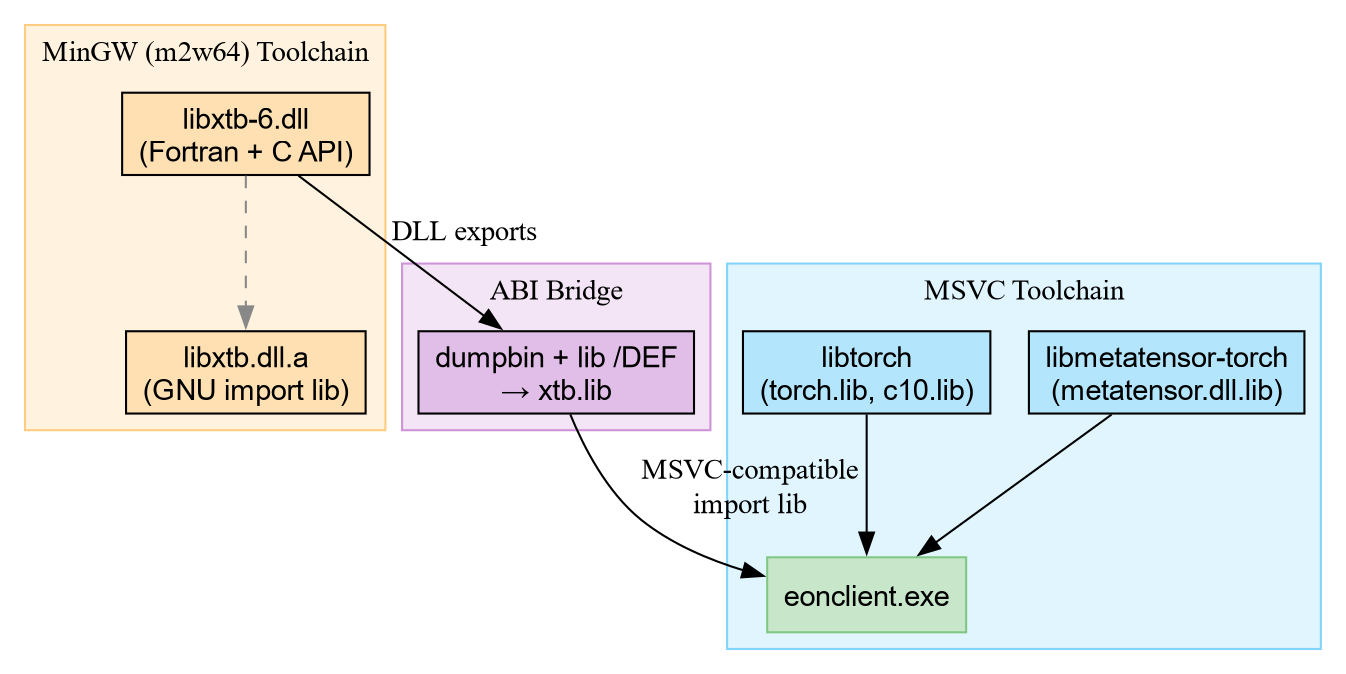
Figure 4: The ABI bridge: generating an MSVC import library from a MinGW-built DLL allows a single executable to link against both toolchain ecosystems.
find_library and Missing Import Libraries
A related pattern appears in the libtorch integration from the same
feedstock PR.
The meson build finds torch libraries with find_library, which
defaults to required: true:
1lib_torch_list = ['c10', 'torch', 'torch_cpu', 'torch_global_deps']
2tdeps = []
3foreach lib_name : lib_torch_list
4    tdeps += cppc.find_library(lib_name, dirs: [LIB_TORCH_LIB_PATH])
5endforeach
On Windows, torch_global_deps ships as a DLL with no corresponding
.lib import library. It exists solely to set up runtime library search
paths for CUDA and has no exported symbols needed at link time. The
equivalent CMake build handles this gracefully:
1foreach(lib c10 torch torch_cpu torch_global_deps)
2  find_library(${lib}_LIB ${lib} PATHS ${LIB_TORCH_LIB_PATH} NO_DEFAULT_PATH)
3  if(${lib}_LIB)
4    target_link_libraries(eonclib PUBLIC ${${lib}_LIB})
5  endif()
6endforeach()
The CMake version silently skips missing libraries. The meson version
treats every entry as mandatory. The fix is to add required: false and
check .found(), which is the meson equivalent of the CMake
pattern 13.
Cap’n Proto Code Generation and MSVC
Adding Cap’n Proto RPC support to the v2.11.1
feedstock exposed
three sequential failures on Windows, each revealed only after the
previous one was fixed. The serve mode integration uses
rgpot as a meson subproject,
which compiles Potentials.capnp into C++ sources at build time.
capnpc vs capnp compile
The original meson build used capnpc with -o and c++:@OUTDIR@ as
separate arguments. On Linux, capnpc accepted this fine. Windows
capnpc.EXE from conda-forge did not recognize -o at all – not as a
separate token, not concatenated. The portable alternative is the
capnp compile subcommand:
1# Portable (works everywhere)
2capnp compile -oc++:outdir --src-prefix=srcdir schema.capnp
3
4# Linux-only (fails on Windows capnpc.EXE)
5capnpc -o c++:outdir --src-prefix=srcdir schema.capnp
This is not documented as a platform difference in the Cap’n Proto docs.
The capnp compile interface is the stable one; capnpc appears to be
a convenience wrapper with inconsistent flag parsing across platforms.
The .c++ File Extension
capnp compile -oc++ generates Potentials.capnp.c++ and
Potentials.capnp.h. GCC and Clang accept .c++ as a valid C++
extension. MSVC’s cl.exe does not 14. Meson passes the file to
the compiler, cl.exe silently ignores it, and the linker fails
downstream with
LNK1181: cannot open input file 'Potentials.capnp.c++.obj' because the
object was never produced.
The fix is a thin Python wrapper that runs capnp compile and renames
the output from .c++ to .cpp. The meson custom_target declares the
renamed extension:
 1python = find_program('python3', 'python')
 2capnp = find_program('capnp')
 3
 4gen_rpc = custom_target(
 5    'gen_rpc',
 6    input: 'Potentials.capnp',
 7    output: ['Potentials.capnp.cpp', 'Potentials.capnp.h'],
 8    command: [python, meson.current_source_dir() / 'capnp_compile.py',
 9              capnp, '@OUTDIR@', meson.current_source_dir(), '@INPUT@'],
10)
The wrapper itself is straightforward:
1subprocess.check_call([capnp, "compile", f"-oc++:{outdir}",
2                       f"--src-prefix={src_prefix}", schema])
3old = os.path.join(outdir, f"{base}.capnp.c++")
4new = os.path.join(outdir, f"{base}.capnp.cpp")
5if os.path.exists(old):
6    shutil.move(old, new)
Missing Transitive ws2_32 Dependency
With code generation fixed, the build reached step
[131/143] before the final link produced 22 unresolved
externals:
1kj-async.lib(async-io-win32.c++.obj) : error LNK2019: unresolved external symbol __imp_accept
2kj-async.lib(async-io-win32.c++.obj) : error LNK2019: unresolved external symbol __imp_bind
3kj-async.lib(async-io-win32.c++.obj) : error LNK2019: unresolved external symbol __imp_closesocket
Cap’n Proto’s kj-async uses Winsock2 for async I/O on Windows. On
Linux, the equivalent functions live in libc and need no extra
linkage. The conda-forge capnproto package ships kj-async.lib as a
static library; static libraries on Windows do not carry their link
dependencies 15. The consumer must link ws2_32 explicitly.
 1_ptlrpc_extra_deps = [capnp_rpc_dep]
 2if host_machine.system() == 'windows'
 3    _ptlrpc_extra_deps += cppc.find_library('ws2_32')
 4endif
 5
 6ptlrpc_dep = declare_dependency(
 7    link_with: ptlrpc,
 8    sources: gen_rpc,
 9    include_directories: _incdirs,
10    dependencies: _ptlrpc_extra_deps,
11)
Downstream consumers of ptlrpc_dep get ws2_32 automatically on
Windows through meson’s dependency propagation. The situation is
analogous to the xtb import library problem described above: the
conda-forge package assumes its consumers know what system libraries to
add. The fix pattern is shown in Figure
5.

Figure 5: The missing link: kj-async.lib references Winsock2 symbols but the conda-forge package does not declare ws2_32 as a dependency. The consumer’s declare_dependency must propagate it explicitly.
Concluding Remarks
None of these issues are particularly deep. The reserved filenames have
been documented since DOS. The 1 MB stack has been the default for
decades. The MinGW/MSVC split has been the status quo on conda-forge for
as long as Fortran has been involved. Cap’n Proto’s code generation
defaults (capnpc, .c++ extensions) assume a GCC-like toolchain. The
common thread is that they surface only when CI runs on a platform the
developer does not use daily, with error messages ranging from cryptic
(0xC00000FD) to absent (WriteConsole) to quietly fatal linker
errors.
The practical advice is simple: add Windows to the CI matrix early, pay extra attention to legacy Fortran components where stack allocation is the default, and do not assume that “requires library X” implies “requires the toolchain that built library X”. When using static libraries from conda-forge on Windows, check for missing system library dependencies that shared-library builds would resolve automatically. And perhaps keep a list of DOS device names somewhere visible.
References
Bigi, Filippo, Joseph W. Abbott, Philip Loche, Arslan Mazitov, Davide Tisi, Marcel F. Langer, Alexander Goscinski, et al. 2026. “Metatensor and Metatomic : Foundational Libraries for Interoperable Atomistic Machine Learning.” Journal of Chemical Physics 164 (6): 64113. https://doi.org/10.1063/5.0304911.
Goswami, Rohit. 2025. “Efficient Exploration of Chemical Kinetics.” October 24, 2025. https://doi.org/10.48550/arXiv.2510.21368.
Goswami, Rohit, Miha Gunde, and Hannes Jónsson. 2026. “Enhanced Climbing Image Nudged Elastic Band Method with Hessian Eigenmode Alignment.” January 22, 2026. https://doi.org/10.48550/arXiv.2601.12630.
Goswami, Rohit, and Hannes Jónsson. 2025. “Adaptive Pruning for Increased Robustness and Reduced Computational Overhead in Gaussian Process Accelerated Saddle Point Searches.” ChemPhysChem, November. https://doi.org/10.1002/cphc.202500730.
Goswami, Rohit, Maxim Masterov, Satish Kamath, Alejandro Pena-Torres, and Hannes Jónsson. 2025. “Efficient Implementation of Gaussian Process Regression Accelerated Saddle Point Searches with Application to Molecular Reactions.” Journal of Chemical Theory and Computation, July. https://doi.org/10.1021/acs.jctc.5c00866.
which makes stuff like metatensor pretty impressive ↩︎
I haven’t had a windows machine in over a decade and a half ↩︎
eOn is a saddle point search code for long timescale dynamics simulations on atomic systems, combining a Python server with a C++ client. See the documentation for details. ↩︎
Reproduction repositories for the associated publications are available: GPR-dimer, OTGPD, NEB-MMF, Metatensor, and BRMS rotations. ↩︎
It handled auxiliary benchmark configuration. The name made perfect sense in context, which is approximately how all of these stories begin. ↩︎
git clonefails witherror: invalid path 'asv_runner/aux.py'on Windows, because the filesystem refuses to create the file. ↩︎The
.conformat describes atomic configurations and is native to eOn. The format name predates my involvement by roughly two decades. ↩︎courtesy of my doctoral thesis advisor.. ↩︎
WriteConsolewrites to the console screen buffer directly, bypassing the standard I/O layer. When the handle is a file, there is no screen buffer to write to. ↩︎wake me when we have the one true universal compiler.. ↩︎
Every package in the xtb dependency chain (mctc-lib, multicharge, dftd4, tblite, xtb) uses
m2w64_candm2w64_fortranon Windows. The Python wrappers (xtb-python, tblite-python) sidestep the problem entirely by using CFFI for runtime loading rather than link-time binding. ↩︎and the forward thinking
tblite↩︎The meson documentation notes that
find_libraryreturns adependencyobject. Withrequired: false, the returned object’s.found()method can be checked before use, mirroring CMake’sif(${lib}_LIB)idiom. ↩︎MSVC recognizes
.c,.cpp,.cxx, and.ccby default. The/Tpflag can force a file to be treated as C++, but meson does not inject it for unknown extensions. ↩︎On Linux, shared libraries (
.so) record their dependencies inDT_NEEDEDentries, resolved at load time. Static libraries (.a) on both platforms are just archives of object files – but the Linux linker pulls symbols transitively from shared deps while the Windows linker requires every static dependency to be listed explicitly. ↩︎
Series info
EON series
- Reconciling eOn for Academia and Open Source
- Windows Compatibility and Scientific Computing <-- You are here!
Series info
Fortran Frontiers: Bridging Legacy to Modernity series
- Handling Legacy Fortran Code
- Windows Compatibility and Scientific Computing <-- You are here!